ChatFilter / Reportsystem
A simple Hytale mod providing a chat filter and an easy-to-use in-game report system.
Скриншоты



Описание
Мод ChatFilter начинался как простой Chat/Profanity-Filter, во время разработки я знал, что не могу охватить все возможные обходные пути. Поэтому я добавил простую систему отчетов.

Ключевые особенности:
- Конфигурация чат-фильтра
- Разрешения для каждой команды
- Внутриигровые команды для изменения фильтрации
- Уведомление любых администраторов, если игрок получает сообщение
- Собственный пользовательский интерфейс для администраторов для обработки отчетов
- Kick, Tempban или Permaban сообщили об игроках
Известные проблемы:
Синхронизация Kick ScreenИногда, даже после того, как игрок успешно удален с сервера, клиент Hytale все еще может казаться подключенным и не показывать экран удара. Кажется, что это иссус с самим собой. Я добавил (временное) сообщение, которое отправляется игроку, которое имеет тот же контент, что и сообщение экрана, и запрос, который игрок должен отключить вручную.
Проблема Scuntthorpe: Это может привести к ложным срабатываниям в обнаружении слов, особенно с очень короткими словами. Я добавлю белый список в будущем, чтобы хотя бы немного противостоять этой проблеме. -> Добавлен белый список в 1.0.1
Команды:
- чатфильтр
- /chatfilter add <Word>
- /chatfilter скачать <Word>
- Список чатфильтров
- /chatfilter mode <censor/block>
- /chatfilter sync
- /chatfilter test <Word>
- чатфильтр белый список
- /chatfilter whitelist add <Word>
- /chatfilter whitelist скачать <Word>
- /chatfilter белый список
- /report <Player> <Reason>
- /отчеты
Вы можете увидеть, что каждая команда может сделать (если не объяснить) ниже в «Разрешениях». часть
Витрина:
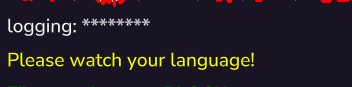
Отфильтрованное сообщение в режиме «цензор»:
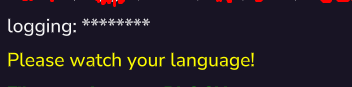
Отфильтрованное сообщение в режиме «блок»:

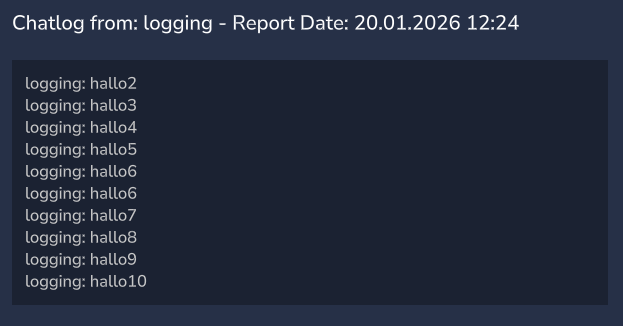
Отчет UI:

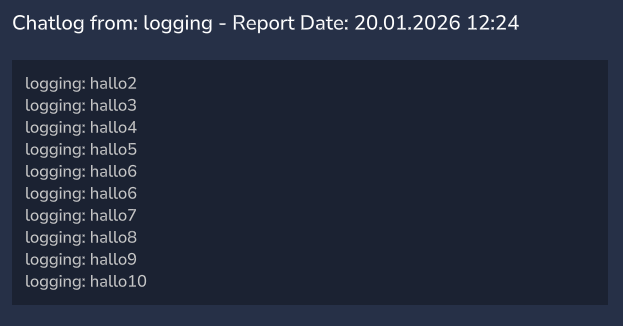
Chatlog (последние 10 сообщений от игрока)
Разрешения:
Разрешения на использование чатфильтра
- chatfilter.command.chatfilter | Позволяет вам /chatfilter (что довольно бесполезно и показывает только подкоманды, которые вам разрешено использовать)
- chatfilter.command.chatfilter.add | Позволяет добавлять Несколько слов о фильтре
- chatfilter.command.chatfilter.remove - позволяет удалять Несколько слов о фильтре
- chatfilter.command.chatfilter.list | Позволяет перечислить все фильтрованные слова

- chatfilter.command.chatfilter.mode | Позволяет изменять режим фильтра (цензор просто заменяет каждый плохой обугл; полностью блокирует сообщение)
- chatfilter.command.chatfilter.sync | Позволяет синхронизировать/перезагрузить конфигурацию, если вы отредактировали конфигурационный файл на сервере, пока он остается онлайн
- chatfilter.command.chatfilter.test | Позволяет проверить, будет ли сообщение отфильтровано
- chatfilter.command.chatfilter.whitelist | Позволяет вам /chatfilter whitelist (который довольно бесполезен и показывает только подкоманды, которые вам разрешено использовать)
- chatfilter.command.chatfilter.whitelist.add | Позволяет добавить слово в белый список
- chatfilter.command.chatfilter.whitelist.remove | Позволяет удалить слово из белого списка
- chatfilter.command.chatfilter.whitelist.list | Позволяет перечислить все слова в белом списке
Разрешения на доклады
- Каждый может сообщить обо всем (кроме себя)
- chatfilter.command.reports | Любой, у кого есть такое разрешение, будет уведомлен, когда об этом сообщит игрок. ПРИМЕЧАНИЕ: Любой человек с этим обязательством может бить и бить с помощью интерфейса, пожалуйста, берите это обязательство тщательно.
Показать оригинальное описание (English)
The ChatFilter mod started as simple Chat/Profanity-Filter, during the development, I knew i can't cover every possible bypass. So I added a simple Report-System.
Key-Features:
- Light-Weight Chatfilter Config
- Permissions for pretty every command
- In-game commands to change filtering
- Notification to any admins if a player is getting reported
- Own UI for admins to process the reports
- Kick, Tempban or Permaban reported players
Known Issues:
Kick Screen Sync: Sometimes, even after a player is successfully kicked from the server, the Hytale client may still appear connected and fail to show the kick screen. This seems to be a issus with hytale it self. I added a (temporary) message that is sent to the player, which has the same content as the screen message and a request that the player must disconnect manually
Scuntthorpe Problem: Simply explained, it can lead to false positives in the word detection, especially with very short words. I'll add a whitelist in the future to counter this Problem at least a bit. -> I added a whitelist in 1.0.1 now
Commands:
- /chatfilter
- /chatfilter add <Word>
- /chatfilter remove <Word>
- /chatfilter list
- /chatfilter mode <censor/block>
- /chatfilter sync
- /chatfilter test <Word>
- /chatfilter whitelist
- /chatfilter whitelist add <Word>
- /chatfilter whitelist remove <Word>
- /chatfilter whitelist list
- /report <Player> <Reason>
- /reports
You can see what each command can do (if not self-explanatory) below in the "Permissions" Part
Showcase:
A filtered message with "censor" mode:
A filtered message with "block" mode:
Report-UI:
Chatlog (last 10 messages from the reported player)
Permissions:
Chatfilter-permissions
- chatfilter.command.chatfilter | Allows you /chatfilter (which is pretty useless and only shows the subcommands you are allowed to use)
- chatfilter.command.chatfilter.add | Allows you to add a word to the filter
- chatfilter.command.chatfilter.remove | Allows you to remove a word to the filter
- chatfilter.command.chatfilter.list | Allows you to list all filtered words
- chatfilter.command.chatfilter.mode | Allows you to change the Filter-Mode (censor just replace every bad char; block the message completely)
- chatfilter.command.chatfilter.sync | Allows you to sync/reload the config if you edited the config-file on the server while it stays online
- chatfilter.command.chatfilter.test | Allows you to test if a message would be filtered
- chatfilter.command.chatfilter.whitelist | Allows you /chatfilter whitelist (which is pretty useless and only shows the subcommands you are allowed to use)
- chatfilter.command.chatfilter.whitelist.add | Allows you to add a word to the whitelist
- chatfilter.command.chatfilter.whitelist.remove | Allows you to remove a word to the whitelist
- chatfilter.command.chatfilter.whitelist.list | Allows you to list all whitelisted words
Report-permissions
- Everyone can report everyone (except yourself)
- chatfilter.command.reports | Anyone with this permission will be notified when a player is reported. NOTE: ANYONE WITH THIS PERMISSION CAN KICK & BAN WITH THE UI, PLEASE GRANT THIS PERMISSION CAREFULLY