HyVotifier - Votifier Plugin & Mod (NuVotifier / Voting / Vote / Votifier)
✨ A Votifier for Hytale Servers (V1 & V2 Vote Protocol Support). Custom UI! Send Notifications, Sounds, Broadcasts, Commands and much more! Easiest way to reward users for voting! With vote forwarding support!
Скриншоты





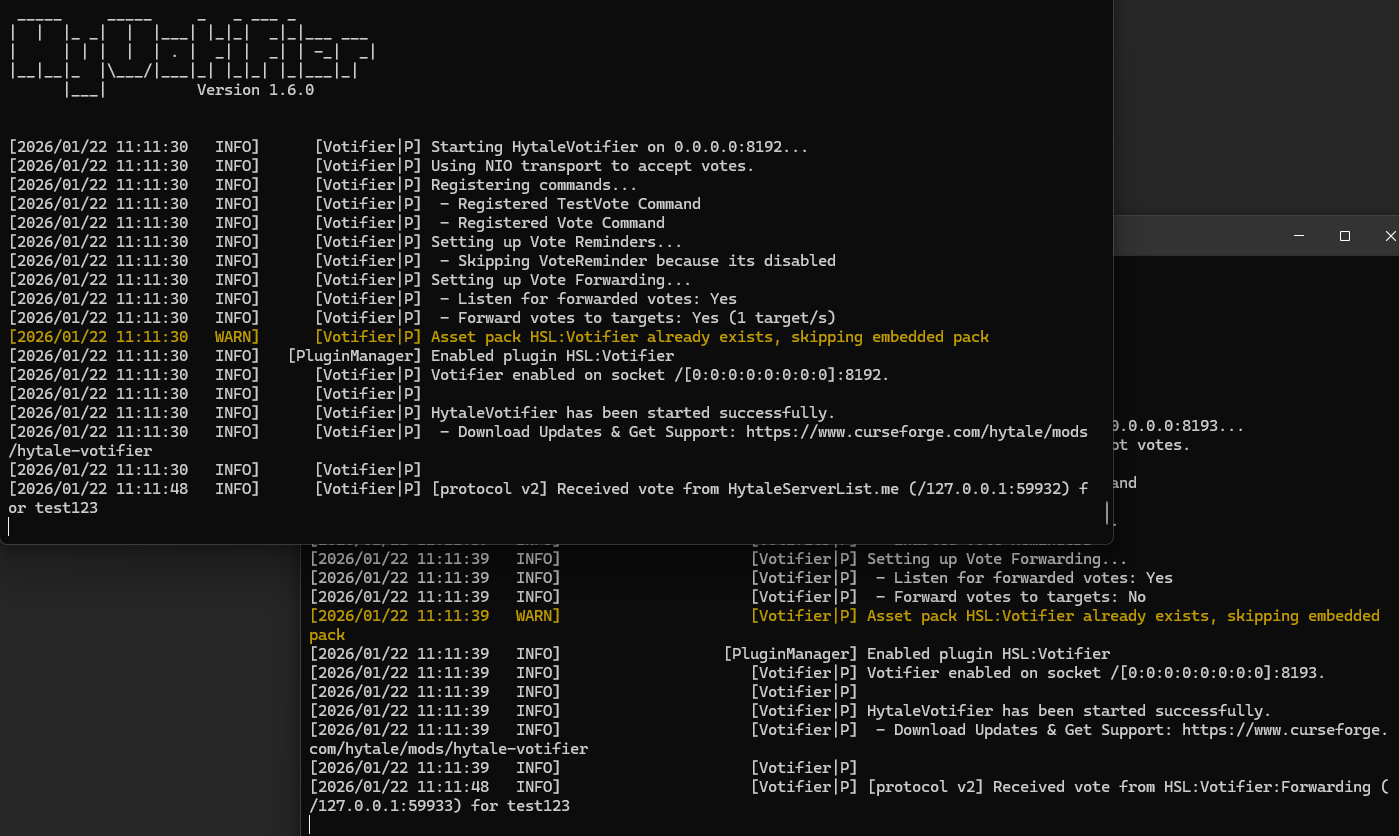
Описание

HyVotifier - это мощный мод / плагин Hytale Votifier, созданный для современных серверов Hytale. Если вы ищете надежный Votifier для Hytale, HyVotifier позволяет легко отслеживать голоса, вознаграждать игроков и повышать активность вашего сервера с помощью полностью настраиваемых функций.
Особенности
- Отправить пользовательские сообщения чата Игрокам после голосования
- Трансляция объявлений о голосовании На весь сервер, когда кто-то голосует
- Запуск команд вознаграждения автоматически на голосовании (работает с другими модами и плагинами)
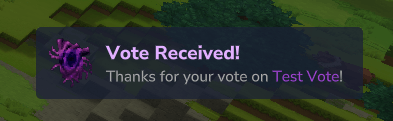
- Показать на экране уведомления о голосовании для мгновенной обратной связи и видимости
- Играйте в пользовательские звуки Когда игрок голосует
- Ежедневные напоминания о голосовании Поощрять последовательное голосование и увеличивать количество голосов
- Тестовые голоса с использованием внутриигровой команды Чтобы проверить все правильно
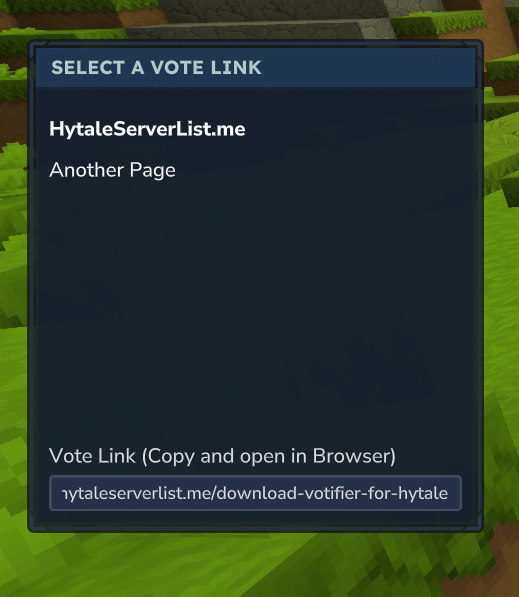
- Обычный голос команды GUI открывает полностью настраиваемое меню, в котором игроки могут Легко копировать голоса
- Кликабельные ссылки для голосования в чате Чтобы легко перенаправить игроков на выбранные вами сайты для голосования.
- Голосование вперед Серверные сети делятся голосами между серверами.
 Присоединяйтесь к нашей розни Быстрая поддержка и отчеты об ошибках!
У вас проблемы с конфигурациями? Используйте этот инструмент для проверки форматирования эррос: https://jsonlint.com
Цветовое форматирование
Поддержка цвета в стиле MiniMessage была добавлена в версии 1.3. Теперь вы можете настраивать сообщения с помощью пользовательских цветов
Использование HyVotifier TaleMessage для цветного форматирования. Доступные теги:
<black>, <dark_blue>, <dark_green>, <dark_aqua>, <dark_aqua>, <dark_purple>, <gold>, <gray>, <dark_gray>, <blue>, <green>, <aqua>, <red>, <light_purple>, <yellow>, <white>
Пример:
<gray>Спасибо за ваш голос по <gold>% от%</gold>. <green> Наслаждайтесь наградами!</green>
Вы даже можете использовать цвета радуги! Пример:
<gradient:red:yellow:green:blue:purple>Радужный градиент!</gradient>
Общая настройка
Пример config.json:
{ "BindHost": "0.0.0.0", "BindPort": 8193, "DisableV1Protocol": ложный, "DebugMode": ложный, "Токены": { "HytaleServerList.me": "ugp71IWvPERCSxnh" ??
BindHost: Ip, в который включен этот опцион, оставьте его на 0.0.0.0, если вы хотите использовать свои серверы публично.
BindPort: Порт, который используется для голосования, 8192 является портом по умолчанию.
Инвалидный протокол V1Это означает, что HyVotifier не прислушивается к голосу v1.
ТокеныПротокол V2 Токены. Вам не нужно указывать токены, если вы не используете веб-сайт, который использует протокол голосования V2. Прокрутите вниз до "Безопасность и как это работает"раздел, чтобы узнать, когда токены необходимы, а когда нет.
Вознаграждение
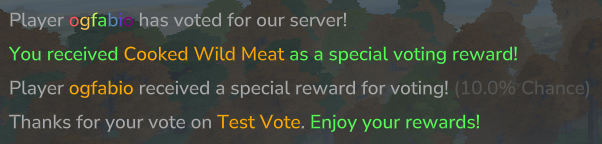
Вы можете настроить вознаграждения в виде команд, которые выполняются в консоли. Команды могут быть настроены так, что они выполняются для каждого голоса, и вы можете настроить команды rng, которые работают на основе шанса.
Примеры rewards.json:
{ "Наградные команды": Дайте %-плеер % Food_Wildmeat_Cooked — количество = 10. Дайте % игрока % Potion_Health_Small — количество = 3 ] "Вознаграждение": "<gray>Спасибо за ваш голос по <gold>% от%</gold>. <green> Наслаждайтесь наградами!</green> ] "BroadcastWhenOffline": ложный, "RewardBroadcasts": "<gray>Player <gradient:red:yellow:green:blue:purple>%player%</gradient> Проголосовал за наш сервер!</gray> ] "RngRewardsEnabled": правда, "RngRewardsNothingChance": 0,0, "RngRewards": { "Процент": 10.0, "Команда": Дайте %-мужчине %-мужчине — количество = 25 ] "BroadcastMessages": "<gray>Player <gold>%player%</gold> получил специальное вознаграждение за голосование! <dark_gray>(%chance%% Chance) ] "Сообщения": <green>Вы получили <gold>Popcorn</gold> в качестве специального вознаграждения за голосование! ] ? { "Процент": 10.0, "Команда": Дайте % игрока % Food_Wildmeat_Cooked — количество = 25 ] "BroadcastMessages": "<gray>Player <gold>%player%</gold> получил специальное вознаграждение за голосование! <dark_gray>(%chance%% Chance) ] "Сообщения": <green>Вы получили <gold>Cooked Wild Meat</gold> в качестве специального вознаграждения за голосование! ] ? { "Процент": 5.0, "Команда": Дайте % игрока % Ore_Adamantite — количество = 12 ] "BroadcastMessages": "<gray>Player <gold>%player%</gold> получил <green>rare reward</green> за голосование! <dark_gray>(%chance%% Chance) ] "Сообщения": "<green>Вы получили <old>Adamantite Ore</gold> как <green>rare</green> Награда за голосование! ] ? ]?RngRewards: Список специальных наград, которые могут быть выбраны случайным образом, когда игрок голосует. Каждая награда имеет свой процент шансов, команд и сообщений. Проценты работают пропорционально и не должны составлять до 100%.
Сообщения: Список сообщений, передаваемых всем онлайн-игрокам, когда выбрано это конкретное вознаграждение RNG. Оставьте пустой, чтобы отключить. Поддерживаемые заполнители: «% Player%», «% From%», «% Chance%»
Уведомления
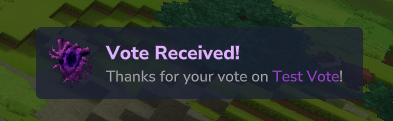
Пример notification.json:
{ "Включено": правда, «TitleMessage»: «<#e2b0ff>Голосование получено!</#e2b0ff>», "TitleColor": "#e2b0ff", "Послание по описанию": "<gray>Спасибо за ваш голос по <#9f44d3>% от%</#9f44d3>!</gray>" "Цвет описания": "#9f44d3", «IconItem»: «Ingredient_Voidheart»?
включенный: Позволяет переключать эту функцию на или выключать.
Заголовок сообщенияОсновное сообщение для уведомления, которое отображается сверху.
Название: ЦветЦвет шести для названия. (Больше не требуется, см. раздел Поддержка цвета)
ОписаниеПосланиеВторичное сообщение для уведомления, которое отображается внизу.
Описание Цвет: Цвет для описания. (Больше не требуется, см. раздел Поддержка цвета)
икона: Наименование объекта, которое отображается слева от Уведомления. Это может быть любой продукт, доступный на вашем сервере!
Напоминания о голосовании

Пример: voteReminder.json:
{ "Включено": правда, "SendOnJoin": правда, «ExpireAfterHours»: 24 «DelayInMinutes»: 1 «Послание»: «<red><b>Heads Up!</b></red> <gray>Вы сегодня не голосовали! Сделайте это с помощью <green>'/vote'</green>, чтобы получить бесплатные награды!</gray>, "Название": { "Включено": правда, «Заголовок»: «Напомнить название!» "Подзаголовок": Не забудьте проголосовать за бесплатные награды! "Второй период": 3, "FadeInSeconds": 0,5, "FadeOutSeconds": 0,5 ? "Уведомление": { "Включено": правда, «TitleMessage»: «<#e2b0ff>Напоминание!</#e2b0ff>» «Послание описания»: «<gray>Не забудьте <#9f44d3>/vote</#9f44d3> для бесплатных наград!» «IconItem»: «Tool_Growth_Potion» ? "Звук": { "Включено": правда, "Звук": "SFX_Player_Pickup_Item", «SoundCategory»: «UI» ??
включенный: Позволяет переключать эту функцию на или выключать.
Отправить OnJoin: Отправляет напоминание сразу же после того, как игрок появился на сервере, если он еще не проголосовал.
Исчезнуть через несколько часов: Как долго голосование должно оставаться действительным. Если это время истекает, игрок снова начинает получать напоминания.
Отсрочка: Как часто следует отправлять напоминание.
Послание: Послание для напоминания. (Оставьте пустой, чтобы отключить)
Название (в верхней части экрана)

Уведомление (в правом нижнем углу)
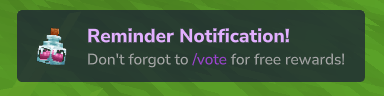
Звуки
Пример: sound.json:
{ "Включено": правда, "Звуковое имя": "SFX_Portal_Neutral_Open", «SoundCategory»: «UI»?
включенный: Позволяет переключать эту функцию на или выключать.
Звуковое имя: Звук, который вы хотите воспроизвести для пользователя после голосования.
SoundCategory: Категория для звука. Не знаю, как именно это используется, поэтому я добавил его в качестве настраиваемого варианта. Оставьте на UI, чтобы использовать все звуки Hytale по умолчанию.
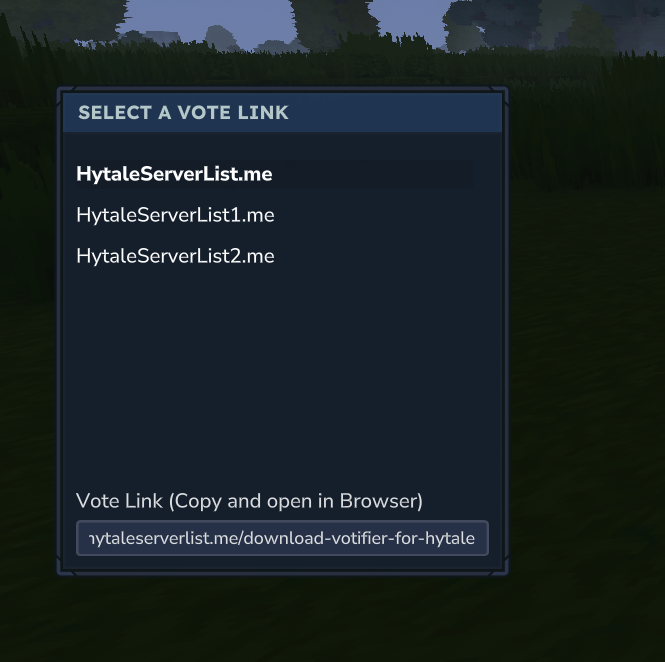
Clickable Vote Links и Custom Gui
Пример: voteCommand.json:
{ "Включено": правда, "OpenCustomGui": правда, "SendChatMessage": правда, "ChatMessageHeader": "<серый>----------------- <gold><b> Наши ссылки для голосования</b></gold> --------------------- <white> Нажмите на ссылку для голосования, чтобы открыть ее в своем браузере. ] "ChatMessageFooter": "<серый>----------------- <gold><b> Наши ссылки для голосования</b></gold> ------------------ ] "ChatMessageTemplate": "<gold>[<yellow>#%id%</yellow>]</gold><yellow><click:%link%>%name% <b>(Click></click></yellow>", "VoteLinks": { "HytaleServerList.me":https://hytaleserverlist.me/download-votifier-for-hytale" ??включенный: Позволяет переключать эту функцию на или выключать.
Голосуйте Линкс: Ссылки, которые пользователи могут посетить, чтобы проголосовать за ваш сервер. Вы можете использовать %player% placeholder для ссылок для голосования, чтобы вставить имя пользователя в ссылку.
OpenCustomGui: Открывает пользовательский гуй, когда включен.
ОтправитьChatMessage: Отправляет сообщение чата с кликабельными ссылками при включении.
ChatMessageHeader и ChatMessageFooter и Обсуждение ChatMessageTemplate:
При нажатии он открывает всплывающее окно подтверждения и перенаправляет игроков прямо на сайт!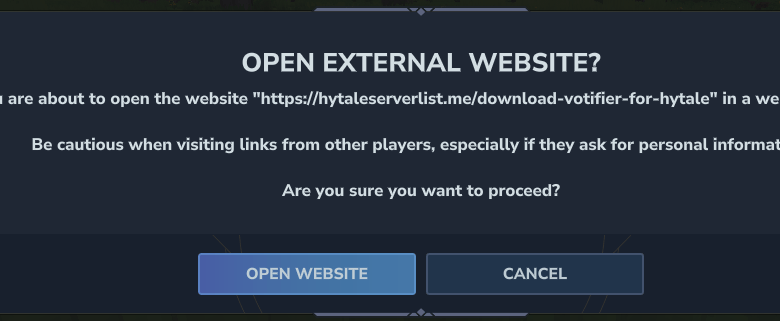
Голосуйте за продвижение
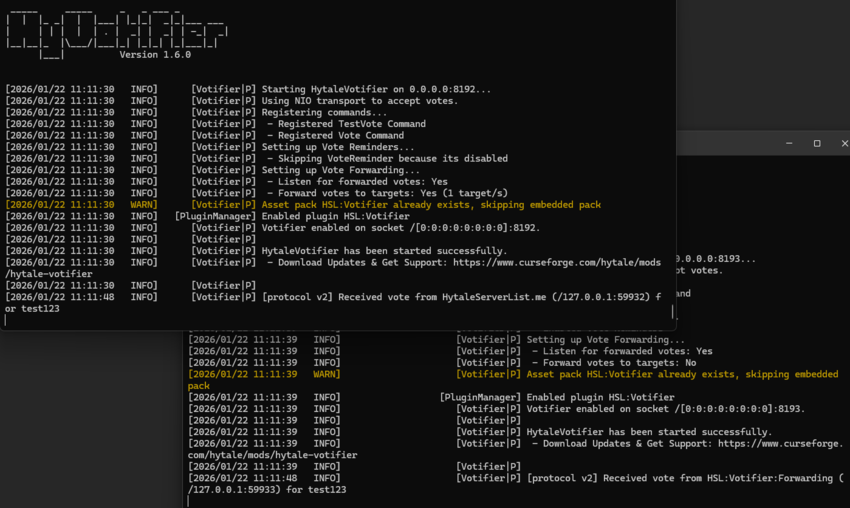
Переадресация голосов позволяет рассчитывать один голос на нескольких серверах Hytale. Это отлично подходит для сетей, поэтому все ваши серверы могут получать одинаковые вознаграждения за голосование.
Пример: voteForwarding.json:
{ "Включено": правда, "ForwardingSecret": "RGqLbdYrgUte", "SendToTargets": ложные, "Продвижение целей": { "Имя": "Примерная цель", "ForwardingSecret": "ForwardingSecret" "Адрес": "Локальный Хост", «Порт»: 8195 ? ]?
Включено: Когда он будет включен, он будет слушать переданные голоса.
Вперед Секрет: Это секрет для конкретного экземпляра плагина HyVotifier.
Отправлять цели: При включении этот экземпляр будет пытаться перенаправить входящие голоса на все настроенные Передовые цели.
Передовые цели: Это множество примеров гивотификатора. Вам нужно ввести секрет пересылки, ip и порт для каждой цели.
Настройка инструкций
Если вы используете HyVotifier для более чем одного сервераКаждый сервер нуждается в Собственный номер порта.
1) Дайте каждому серверу отдельный порт
- Главный сервер: Выберите порт и сделайте его публичный (открыт).
- Другие серверы: выбирать Различные порты Для каждого из них это может остаться закрытый/закрытый.
Твой Главный сервер должен иметь возможность порты других серверов (даже если порты не являются общедоступными).
2) Подключите сайт голосования только к основному серверу
При добавлении сервера на сайт голосования:
Входите только:
- тот IP твоей Главный сервер
- тот порт твоей Главный сервер
Не добавляйте другие серверы на сайт, если вы не знаете, что делаете.
3) Ключи/токены (Votifier v1 vs v2)
В зависимости от версии Votifier:
Водитель v1
- Используйте только публичный ключ от вашего Главный сервер
Водитель v2
- Поставьте только сайт токены в Главный сервер
config.yml
Только Главный сервер Он должен быть установлен на сайте голосования — он автоматически передаст голоса другим.
Команды
/testvote <player>
Разрешение: Проверка
Описание: Проводит имитируемое голосование за указанного игрока. Приятно проверить свою конфигурацию!
/голосовать
Разрешение: hsl.votifier.command.vote (без разрешения с версии 1.4)
Описание: Открывает ги для игрока, который позволяет легко копировать ссылки для голосования!
для разработчиков
Все нижеперечисленное предназначено для разработчиков, чтобы интегрировать голосование в свои собственные моды или веб-сайт для голосования, такой как HytaleServerList.me.
️ Пользовательское мероприятие
HyVotifier запускает PlayerVoteEvent при регистрации голосования, которое вы можете прослушать в своих собственных модах.
me.hytaleserverlist.mods.hytalevotifier.event.PlayerVoteEventДобавьте наш плагин в зависимости от вашего проекта и подпишитесь на такое мероприятие:
getEventRegistry(.registerGlobal)(PlayerVoteEvent.class, (playerVoteEvent) ->{)// Сделай что-нибудь здесь.}
PlayerVoteEvent.getWorld() - Чтобы получить мир игрока
PlayerVoteEvent.getPlayerRef() - Чтобы получить объект PlayerRef
PlayerVoteEvent.getVote() - Чтобы получить объект голосования
me.hytaleserverlist.mods.hytalevotifier.event.AsyncVote СобытиеЭто событие называется нитью votifier и проходит асинхронно. Он увольняется за любые полученные голоса (также пересылаемые голоса) и не включает ссылку на игрока или мир.
asyncVoteReceivedEvent.getVote() - Чтобы получить объект для голосования
Отправка голосов
Этот мод позволяет отправлять голоса на серверы Hytale, используя оба варианта. Водитель V1 и Водитель V2 протоколы.
Он поддерживает все те же известные функции, что и популярные. Nuotifier Плагин.
NodeJS отправляет пакеты голосов
- V1 Prorocol: https://www.npmjs.com/package/votifier-send
- Протокол V2: https://www.npmjs.com/package/votifier2
Безопасность и как это работает
Оба протокола голосования являются Безопасный и безопасный в использованииНо они работают немного по-разному и в зависимости от веб-сайтов вам нужно выбрать, что работает. Некоторые веб-сайты поддерживают V1 Votes, другие V2 Votes, а некоторые позволяют выбрать версию протокола по вашему вкусу.
Протокол V1 (RSA шифрование)
Протокол V1 использует RSA Keypair для шифрования голосов. Вы должны предоставить содержимое файла «rsa/public.key» на веб-сайт. Ты Не надо В этом случае необходимо настроить токен.
- Владельцы серверов предоставляют Публичный ключ RSA на веб-сайт для голосования (находится в "mods/HSL_Votifier/rsa/public.key")
Протокол V2 (токен/HMAC)
Для сайтов, использующих протокол V2, необходимо настроить токен. Сайт предоставит вам название службы и знак (Некоторые сайты позволяют вам выбрать свой собственный токен). Вы можете добавить их в свой config.yml вот так:
"Токены": { "<ServiceName, предоставленный сайтом>": "<Токен/секрет, предоставленный сайтом>"?
Конфигурация Firewall
Если вы по-прежнему не получаете голоса от голосовавших веб-сайтов, это, скорее всего, потому, что вы не можете получить их. Порт Votifier не может принимать трафик TCP Это означает, что порт закрытый.
Чтобы проверить это, вы можете использовать веб-сайт проверки портов, такой как: https://ping.eu/port-chk/
Просто введите Водитель IP и Порт VotifierЗатем щелкните Иди.. Если вы видите сообщение "... Порт закрыт".Избирательные сайты не смогут подключиться к вашему плагину Votifier.
В этом случае вам нужно будет Открыть порт Votifier и позволяют TCP трафик.
Если вы находитесь на a VPS или выделенный сервер С доступом к терминалу/ОС вы можете использовать:
sudo ufw разрешит <VOTIFIER_PORT>/tcp
или:
Sudo iptables - A INPUT -p tcp -dport <VOTIFIER_PORT> -j Принятие
Если вы используете a Игровой серверВам нужно будет проверить настройки брандмауэра на панели хостинга или связаться с их поддержкой, чтобы запросить дополнительный открытый порт для связи Votifier.
Кредиты
Для подробного ознакомления с документацией: https://hytaleserverlist.me/download-votifier-for-hytale
Посмотреть NuVotifier для Minecraft: https://github.com/NuVotifier/NuVotifier
TaleMessage: https://github.com/InsiderAnh/TaleMessage
В последующие дни будет создано публичное хранилище для государственных взносов. Наслаждайтесь! ❤️
Показать оригинальное описание (English)
HyVotifier is a powerful Hytale Votifier mod/plugin built for modern Hytale servers. If you’re looking for a reliable Votifier for Hytale, HyVotifier makes it easy to track votes, reward players, and boost your server’s activity with fully customizable features.
🌟 Features
- Send custom chat messages to players after they vote
- Broadcast vote announcements to the entire server when someone votes
- Run reward commands automatically on vote (works with other mods & plugins)
- Show on-screen vote notifications for instant feedback and visibility
- Play custom sounds when a player votes
- Daily vote reminders to encourage consistent voting and boost vote counts
- Test votes using an in-game command to verify everything is set up correctly
- Custom vote GUI command that opens a fully configurable menu where players can easily copy vote links
- Clickable Vote Links in Chat to easily redirect players to your voting websites of choice.
- Vote Forwarding for Server Networks to share votes across servers.
Join our Discord for quick support and bug reports!
Having trouble with your configs? Use this tool to check for formatting erros: https://jsonlint.com/
✨ Color Formatting
MiniMessage style color support was added in Version 1.3. You can now configure messages with custom colors
HyVotifier uses TaleMessage for color formatting. Available tags:
<black>, <dark_blue>, <dark_green>, <dark_aqua>, <dark_red>, <dark_purple>, <gold>, <gray>, <dark_gray>, <blue>, <green>, <aqua>, <red>, <light_purple>, <yellow>, <white>
Example:
<gray>Thanks for your vote on <gold>%from%</gold>. <green>Enjoy your rewards!</green>
You can even do rainbow colors! Example:
<gradient:red:yellow:green:blue:purple>Rainbow Gradient!</gradient>
✨ General Setup
Example config.json:
{ "BindHost": "0.0.0.0", "BindPort": 8193, "DisableV1Protocol": false, "DebugMode": false, "Tokens": { "HytaleServerList.me": "ugp71IWvPERCSxnh" }}
BindHost: The Ip that votifier listes on, leave it at 0.0.0.0 if you want to use your servers public ip
BindPort: The port that is used to listed for votes, 8192 is the default port
DisableV1Protocol: Makes it so HyVotifier does no loger listen for v1 votes.
Tokens: V2 Protocol Tokens. You don’t need to specify tokens unless you’re using a website that is using the V2 Vote Protocol. Scroll down to the "🔐 Security & How It Works" section to learn when tokens are required and when they aren’t.
✨ Rewards
You can setup rewards in form of commands that execute in the console. Commands can be configured so they execute for every vote and you can configure rng commands that run based on a chance.
Example rewards.json:
{ "RewardCommands": [ "give %player% Food_Wildmeat_Cooked --quantity=10", "give %player% Potion_Health_Small --quantity=3" ], "RewardMessages": [ "<gray>Thanks for your vote on <gold>%from%</gold>. <green>Enjoy your rewards!</green>" ], "BroadcastWhenOffline": false, "RewardBroadcasts": [ "<gray>Player <gradient:red:yellow:green:blue:purple>%player%</gradient> has voted for our server!</gray>" ], "RngRewardsEnabled": true, "RngRewardsNothingChance": 0.0, "RngRewards": [ { "Percentage": 10.0, "Commands": [ "give %player% Food_Popcorn --quantity=25" ], "BroadcastMessages": [ "<gray>Player <gold>%player%</gold> received a special reward for voting! <dark_gray>(%chance%% Chance)" ], "Messages": [ "<green>You received <gold>Popcorn</gold> as a special voting reward!" ] }, { "Percentage": 10.0, "Commands": [ "give %player% Food_Wildmeat_Cooked --quantity=25" ], "BroadcastMessages": [ "<gray>Player <gold>%player%</gold> received a special reward for voting! <dark_gray>(%chance%% Chance)" ], "Messages": [ "<green>You received <gold>Cooked Wild Meat</gold> as a special voting reward!" ] }, { "Percentage": 5.0, "Commands": [ "give %player% Ore_Adamantite --quantity=12" ], "BroadcastMessages": [ "<gray>Player <gold>%player%</gold> received a <green>rare reward</green> for voting! <dark_gray>(%chance%% Chance)" ], "Messages": [ "<green>You received <gold>Adamantite Ore</gold> as a <green>rare</green> voting reward!" ] } ]}RngRewards: A list of special rewards that can be randomly selected when a player votes. Each reward has its own percentage chance, commands, and messages. Percentages work proportionally and don't need to add up to 100%.
BroadcastMessages: A list of messages broadcast to all online players when this specific RNG reward is selected. Leave empty to disable. Supported placeholders: `%player%`, `%from%`, `%chance%`
✨ Notifications
Example notification.json:
{ "Enabled": true, "TitleMessage": "<#e2b0ff>Vote Received!</#e2b0ff>", "TitleColor": "#e2b0ff", "DescriptionMessage": "<gray>Thanks for your vote on <#9f44d3>%from%</#9f44d3>!</gray>", "DescriptionColor": "#9f44d3", "IconItem": "Ingredient_Voidheart"}
Enabled: Lets you toggle this feature on or off.
TitleMessage: The Primary Message for the notification that shows on top.
TitleColor: A Hex Color for the title. (No Longer needed, see Color Support section)
DescriptionMessage: The Secondary Message for the notification that shows at the bottom.
DescriptionColor: The color for the description. (No Longer needed, see Color Support section)
IconItem: The item name that is rendered on the left of the Notification. Can be any Hytale Item that is available on your server!
✨ Vote Reminders
Example voteReminder.json:
{ "Enabled": true, "SendOnJoin": true, "ExpireAfterHours": 24, "DelayInMinutes": 1, "Message": "<red><b>Heads Up!</b></red> <gray>You have not voted today! Do so with <green>'/vote'</green> to receive free rewards!</gray>", "Title": { "Enabled": true, "Title": "Reminder Title!", "SubTitle": "Don't forgot to /vote for free rewards!", "DurationSeconds": 3, "FadeInSeconds": 0.5, "FadeOutSeconds": 0.5 }, "Notification": { "Enabled": true, "TitleMessage": "<#e2b0ff>Reminder Notification!</#e2b0ff>", "DescriptionMessage": "<gray>Don't forgot to <#9f44d3>/vote</#9f44d3> for free rewards!</gray>", "IconItem": "Tool_Growth_Potion" }, "Sound": { "Enabled": true, "Sound": "SFX_Player_Pickup_Item", "SoundCategory": "UI" }}
Enabled: Lets you toggle this feature on or off.
SendOnJoin: Sends the reminder immediately after a player has spawned into the server if they havent voted yet.
ExpireAfterHours: How long a vote should stay valid for. If this time expires the player will start receiving reminders again.
DelayInMinutes: How often the reminder message should be sent.
Message: The message for the reminder. (Leave empty to disable)
Title (at the top center of the screen)
Notification (at the bottom right)
✨ Sounds
Example sound.json:
{ "Enabled": true, "SoundName": "SFX_Portal_Neutral_Open", "SoundCategory": "UI"}
Enabled: Lets you toggle this feature on or off.
SoundName: The sound you want to play for the user after they vote.
SoundCategory: The category for the Sound. Not sure how this is used exactly so i added it as a configurable option. Leave on UI to use all the default Hytale sounds.
✨ Clickable Vote Links & Custom Gui
Example voteCommand.json:
{ "Enabled": true, "OpenCustomGui": true, "SendChatMessage": true, "ChatMessageHeader": [ "<gray>----------------- <gold><b>Our Vote Links</b></gold> -----------------</gray>", "<white>Click on a vote link to open it in your browser." ], "ChatMessageFooter": [ "<gray>----------------- <gold><b>Our Vote Links</b></gold> -----------------</gray>" ], "ChatMessageTemplate": "<gold>[<yellow>#%id%</yellow>]</gold> <yellow><click:%link%>%name% <b>(Click)</b></click></yellow>", "VoteLinks": { "HytaleServerList.me": "https://hytaleserverlist.me/download-votifier-for-hytale" }}Enabled: Lets you toggle this feature on or off.
VoteLinks: The Links that your users can visit to vote for your server. You can use the %player% placeholder for vote links to insert the users name into the link.
OpenCustomGui: Opens the custom gui when enabled.
SendChatMessage: Sends a chat message with clickable links when enabled.
ChatMessageHeader & ChatMessageFooter & ChatMessageTemplate:
When clicked it opens a confirmation popup and redirects players directly to the website!
✨ Vote Forwarding
Vote forwarding lets one vote count on multiple Hytale servers. This is great for networks, so all your servers can receive the same vote rewards.
Example voteForwarding.json:
{ "Enabled": true, "ForwardingSecret": "RGqLbdYrgUte", "SendToTargets": false, "ForwardingTargets": [ { "Name": "Example Target", "ForwardingSecret": "ForwardingSecret", "Address": "localhost", "Port": 8195 } ]}
Enabled: When enabled it will listen for forwarded votes.
ForwardingSecret: This is the secret for that specific instance of the HyVotifier plugin.
SendToTargets: When enabled this instance will try to forward incoming votes to all configured ForwardingTargets.
ForwardingTargets: This is a array of hyvotifier instances. You need to enter a forwarding secret, ip and port for every target.
Setup instructions
If you’re using HyVotifier on more than one server, each server needs its own port number.
1) Give every server a different port
- Main server: Pick a port and make it public (open).
- Other servers: Pick different ports for each one, but these can stay private/closed.
Your main server must be able to reach the other servers’ ports (even if the ports are not public).
2) Only connect the vote website to your main server
When you add your server to a voting website:
Only enter:
- the IP of your main server
- the port of your main server
🚫 Don’t add the other servers to the website unless you know what you are doing.
3) Keys / Tokens (Votifier v1 vs v2)
Depending on the Votifier version:
Votifier v1
- Only use the public.key from your main server
Votifier v2
- Only put the website tokens in the main server’s
config.yml
Only the main server needs to be set up on the vote website — it will forward the vote to the others automatically.
✨ Commands
/testvote <player>
Permission: votifier.test
Description: Runs a simulated vote for the specified player. Good to test your configuration!
/vote
Permission: hsl.votifier.command.vote (No Permission since Version 1.4)
Description: Opens a vote gui for the player which lets you copy vote links easily!
✨ For Developers
Everything below is meant for developers to integrate voting into their own mods or a voting website like HytaleServerList.me.
🎗️ Custom Event
HyVotifier triggers the PlayerVoteEvent when a vote is registered which you can listen for in your own mods.
me.hytaleserverlist.mods.hytalevotifier.event.PlayerVoteEventAdd our plugin as a dependency for your project and subscribe to the event like this:
getEventRegistry().registerGlobal(PlayerVoteEvent.class, (playerVoteEvent) -> {// Do some stuff here});
playerVoteEvent.getWorld() - To get the world of the player
playerVoteEvent.getPlayerRef() - To get the PlayerRef Object
playerVoteEvent.getVote() - To get the Vote Object
me.hytaleserverlist.mods.hytalevotifier.event.AsyncVoteReceivedEventThis event is called on the votifier thread and runs async. It gets fired for any vote that is received (also forwarded votes) and does not include player reference or a world.
asyncVoteReceivedEvent.getVote() - To get the Vote Object
📩 Sending Votes
This mod lets you send votes to Hytale servers using both Votifier V1 and Votifier V2 protocols.
It supports all the same known features as the popular NuVotifier plugin.
NodeJS Vote Sending Packages
- V1 Prorocol: https://www.npmjs.com/package/votifier-send
- V2 Protocol: https://www.npmjs.com/package/votifier2
🔐 Security & How It Works
Both vote protocols are secure and safe to use, but they work slightly differently and depending on the websites implemetation you need to choose what works. Some websites support V1 Votes others V2 Votes and some let you choose a protocol version of your liking.
V1 Protocol (RSA Encryption)
The V1 Protocol uses a RSA Keypair to encrypt votes. You need to provide the contents of the "rsa/public.key" file to the website. You DONT need to configure a token in this case.
- Server owners provide their RSA public key to the voting website (found in "mods/HSL_Votifier/rsa/public.key")
V2 Protocol (Token/HMAC)
For websites using the V2 protocol, you need to configure a token. The website will provide you with a serviceName and token (some sites let you choose your own token). You can then add them to your config.yml like this:
"Tokens": { "<ServiceName provided by the website>": "<Token/Secret provided by the website>"}
Firewall configuration
If you’re still not receiving votes from voting websites, it’s most likely because your Votifier port is not allowed to receive TCP traffic — meaning the port is closed.
To verify this, you can use a port check website like: https://ping.eu/port-chk/
Just enter your Votifier IP and Votifier port, then click Go. If you see a message like “… port is closed”, voting websites will not be able to connect to your Votifier plugin.
In that case, you’ll need to open the Votifier port and allow TCP traffic.
If you’re on a VPS or dedicated server with terminal/OS access, you can use either:
sudo ufw allow <VOTIFIER_PORT>/tcp
or:
sudo iptables -A INPUT -p tcp --dport <VOTIFIER_PORT> -j ACCEPT
If you’re using a game server host, you’ll need to check the firewall settings in the hosting panel, or contact their support to request an additional open port for Votifier communication.
✨ Credits
For a detailed documentation visit: https://hytaleserverlist.me/download-votifier-for-hytale
View NuVotifier for Minecraft: https://github.com/NuVotifier/NuVotifier
TaleMessage: https://github.com/InsiderAnh/TaleMessage
A public repository for public contributions will be set up in the following days. Enjoy! ❤️
Последние версии
hytale-votifier-1.9.0.jar
hytale-votifier-1.8.0.jar
hytale-votifier-1.7.0.jar
hytale-votifier-1.6.1.jar
hytale-votifier-1.6.jar
Информация
Авторы:
Категории:
Версии игры:
Создан: 14.01.2026