Arrow Display HUD
Adds an arrow display on your HUD! (With custom tracking mode!)
Скриншоты
Описание
- Этот мод работает автономно без зависимостей.
- Однако для полной совместимости с другими модами HUD, мультипликатор Требуется.
- Без мультипликаторМод может вызывать ошибки и может не загружаться при использовании вместе с другими модами HUD.
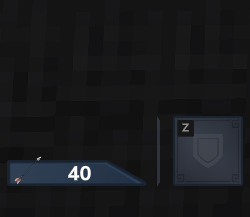
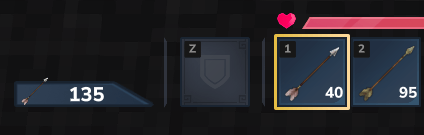
Arrow Display HUD добавляет чистый, легкий и настраиваемый HUD, показывая общее количество стрелок, доступных в вашем инвентаре.Или любой другой предмет!
Особенности
- Полностью настраиваемая позиция HUD с помощью команд
- Отображает общее количество стрел в вашем инвентаре
- Легкий и удобный для производительности
- Опциональная совместимость с другими модами HUD через MultipleHUD
- Режим отслеживания, чтобы отслеживать любой пункт по вашему выбору в вашем инвентаре (как использовать ниже)
- Автомат Скрыть конфигурацию, для сокрытия прятаться, когда счетчик 0
Конфигурационные команды HUD
Дисплей Arrow HUD включает в себя полную внутриигровую систему команд, которая позволяет точно контролировать положение HUD без редактирования файлов или перезапуска игры.
/arrowhud autohide
? Переключите Auto Hide, когда он включен, он автоматически скроет хижину, когда достигнет 0.
/arrowhud set <X> <Y>
? Размещает Arrow HUD в точном положении экрана с использованием пиксельных координат.
/arrowhud up <PX>
? Перемещает HUD вверх по указанному количеству пикселей.
/arrowhud down <PX>
? Перемещает HUD вниз по заданному количеству пикселей.
/arrowhud Left <PX>
? Сдвинет HUD влево для тонкой корректировки выравнивания.
/arrowhud right <PX>
? Сдвиг HUD вправо для корректировок тонкого выравнивания.
/arrowhud presets
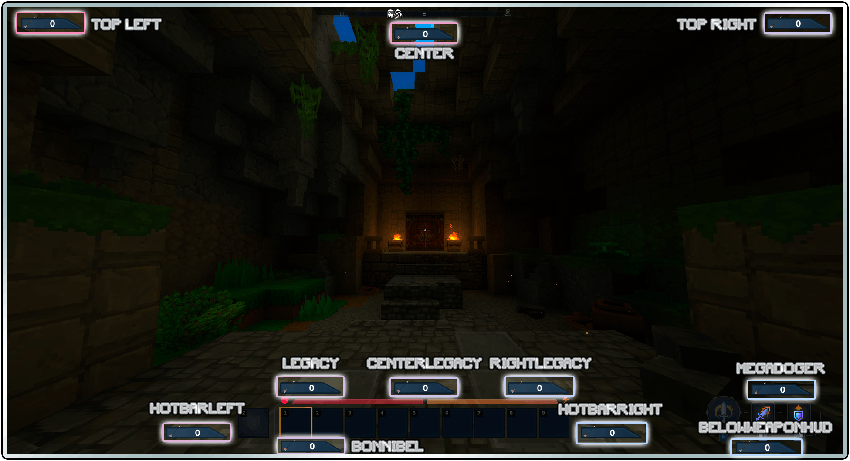
? Отображает все доступные предустановки макета HUD. (Вы также можете увидеть их на изображении ниже)
/arrowhud <preset_name>
Применяет предустановленный HUD. Замените существующий предустановленный набор, показанный командой предустановок или на изображении ниже.
/arrowhud track
? Переключает HUD на режим отслеживания, При активации команда будет использовать элемент cВ настоящее время удерживается в вашей основной руке в качестве ориентира и заставляет HUD подсчитывать все совпадающие элементы во всем вашем инвентаре.
/arrowhud arrow
? Восстановить По умолчанию Arrow HUD.
Важное примечание о предустановках: Предустановки: Верхняя правая, верхняя левая, беловапонгуд и мегадоггер Они могут появляться в несколько разных положениях в зависимости от разрешения экрана. Наши предустановки были первоначально разработаны и протестированы с использованием 1920×1080 В качестве базовой резолюции.
Ожидаемая дорожная карта
- Улучшить визуальный дизайн счетчика стрелок
- Исправьте оставшиеся многопользовательские несоответствия
- Добавить Config UI
Важное уведомление
С тех пор Hytale находится в раннем доступеЭтот мод также экспериментальный и может содержать ошибки.
Пожалуйста, будьте терпеливы, если у вас возникнут какие-либо проблемы, и спасибо за загрузку и поддержку мода! ❤️
Показать оригинальное описание (English)
- This mod works standalone with no dependencies.
- However, for full compatibility with other HUD mods, MultipleHUD is required.
- ⚠ Without MultipleHUD, the mod may cause errors and may fail to load when used alongside other HUD mods.
🏹 Arrow Display HUD adds a clean, lightweight and configurable HUD, showing the total number of arrows available in your inventory (Or any other item!)
Features
- Fully customizable HUD position via commands
- Displays the total arrow count in your inventory
- Lightweight and performance-friendly
- Optional compatibility with other HUD mods via MultipleHUD
- Tracking mode, to track any item of your choice on your inventory (how to use below)
- Auto Hide config, for hiding the hud when the counter is 0
HUD Configuration Commands
Arrow Display HUD includes a full in-game command system that allows you to precisely control the position of the HUD without editing files or restarting the game.
/arrowhud autohide
→ Toggle the Auto Hide, when its ON, it will automatically hide the hud when it reaches 0.
/arrowhud set <X> <Y>
→ Places the Arrow HUD at an exact screen position using pixel coordinates.
/arrowhud up <PX>
→ Moves the HUD upward by the specified number of pixels.
/arrowhud down <PX>
→ Moves the HUD downward by the specified number of pixels.
/arrowhud left <PX>
→ Shifts the HUD to the left for fine alignment adjustments.
/arrowhud right <PX>
→ Shifts the HUD to the right for fine alignment adjustments.
/arrowhud presets
→ Displays all available HUD layout presets. (You can also see them in the image below)
/arrowhud <preset_name>
→ Applies a HUD preset. Replace with an existing preset shown by the presets command or in the image below.
/arrowhud track
→ Switches the HUD to tracking mode, when activated, the command will use the item currently held in your main hand as a reference, and making the HUD count all matching items across your entire inventory.
/arrowhud arrow
→ Restores the default Arrow HUD behavior.
Important note about presets: The presets: TOP RIGHT, TOP LEFT, BELOWWEAPONHUD and MEGADOGER may appear in slightly different positions depending on your screen resolution. Our presets were originally designed and tested using 1920×1080 as the base resolution.
Expected Roadmap
- Improve the visual design of the arrow counter
- Fix remaining multiplayer inconsistencies
- Add Config UI
Important Notice
Since Hytale is still in early access, this mod is also experimental and may contain bugs.
Please be patient if you encounter any issues — and thank you for downloading and supporting the mod! ❤️
Последние версии
Bonnibel_ArrowDisplay-1.1.5.jar
Bonnibel_ArrowDisplay-1.1.3.jar
Bonnibel_ArrowDisplay-1.1.2.jar
Bonnibel_ArrowDisplay-1.1.1.jar
Bonnibel_ArrowDisplay-1.1.0.jar
Информация
Авторы:
Категории:
Версии игры:
Создан: 18.01.2026