Chest Loot Extender
Extend the loot pool for world chests - for mod creators and players
Скриншоты
Описание
О нас
Этот мод направлен на
- Создатели пакетов модов, которые хотят, чтобы их предметы появлялись в сундуках мира
- Игроки, которые хотят настроить пул добычи для сундуков
Как это работает
Плагин способен расширить пул добычи мировых сундуков за счет использования ItemDropLists.
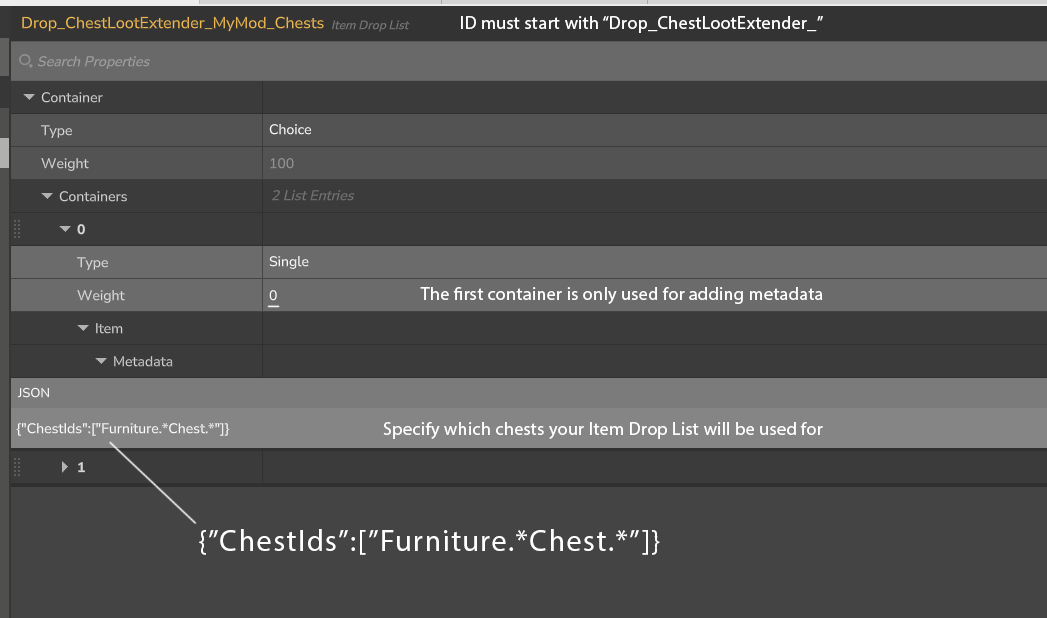
ItemDropList просто должен использовать идентификатор, который начинается с «Drop_ChestLootExtender_», а также некоторые добавленные метаданные, чтобы указать, для каких сундуков будет использоваться ItemDropList.
Может быть любое количество ItemDropLists из любого количества модов. Плагин будет просто рандомизировать ItemDropList для использования, если есть несколько, которые могут быть использованы для данной груди.
Предубеждение
По умолчанию этот плагин будет расширять добычу для любой существующей груди, которая включает в себя любые сундуки, которые вы разместили перед установкой плагина.
Чтобы предотвратить добавление дополнительных элементов в ваши собственные сундуки, вы можете использовать команду /cle-exclude-nearby в своей базе, чтобы плагин игнорировал любые сундуки в радиусе 100 блоков.
Создание ItemDropList
- В редакторе активов нажмите «...» и выберите Add Pack (или используйте существующий, если он у вас есть).
- Нажмите «+», чтобы открыть меню «Создать»
- Установите тип актива для элемента Drop List и используйте идентификатор, который начинается с «Drop_ChestLootExtender_», например «Drop_ChestLootExtender_YourMod_Chests».
- Нажмите Создать
- Во вкладке «Источник» все заменить следующим:
{
"Контейнер": {
"Тип": "Выбор",
"Контейнеры": [
{
"Тип": "Одинокий",
"Вес": 0,
"Предмет": {
"Метадата": {
"Честиды":
"Мебель.*Гость.*"
]
?
?
?
{
"Тип": "Пустой",
«Вес»: 10
?
{
"Тип": "Одинокий",
"Предмет": {
Оригинальное название: Fish_Salmon_Item
?
«Вес»: 1
?
]
?
?
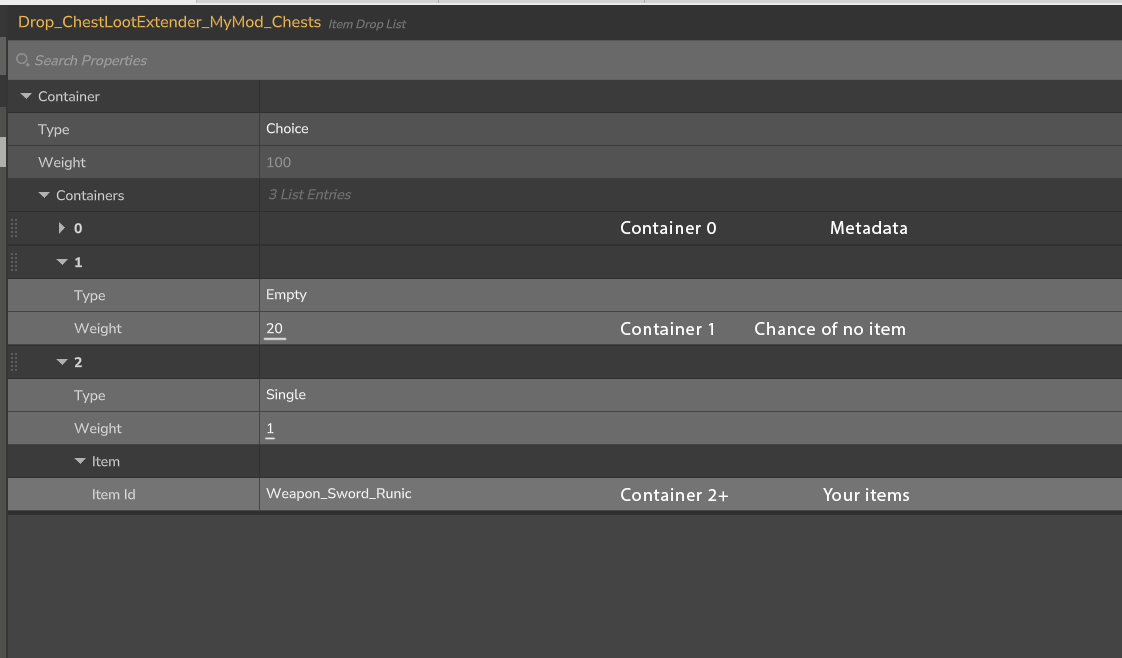
Контейнер 0 - Используется для метаданных, указывая, для каких сундуков будет использоваться ваш список элементов.
Контейнер 1 - Используется для определения того, насколько вероятно, что в грудь не будет добавлен дополнительный элемент.
Остальные контейнеры могут быть использованы для добавления любых предметов, которые вы хотите.
Метаданные ChestIds
Это список идентификаторов, для которых будет использоваться список элементов.
Идентификаторы могут включать в себя RegEx, например, «Мебель.*Chest.*» для выбора всех сундуков.
"Мебель.*Chest.*" - все идентификаторы, начинающиеся со слова "Мебель" и включающие слово "Chest".
Если вы хотите нацелить 2 конкретных сундука:
"Честиды":
"Мебель_Ancient_Chest_Small",
Мебель_Temple_Dark_Chest_Small
]
командование
Команды являются необязательными, так как вам не нужно использовать какие-либо команды для использования плагина.
/cle-reset - Сбрасывает состояние всех сундуков, позволяя плагину расширять добычу любой сундуки, которая открывается.
/cle-exclude-nearby - предотвращает попадание грудной клетки в радиусе 100 блоков от увеличения добычи.
Тестирование вашего ItemDropList
- Положите кучу сундуков.
- Используйте команду /cle-reset (для очистки состояния игрока от сундуков)
- Откройте сундуки.
Если ItemDropList был создан правильно, вы должны увидеть предметы из своего ItemDropList в сундуках.
Чтобы снова проверить, вы должны сначала сломать сундуки, так как в противном случае добыча будет продлена дважды.
Показать оригинальное описание (English)
About
This mod is aimed for
- Mod pack creators who wants to make their items appear in world chests
- Players who want to adjust the loot pool for chests
How it works
The plugin is able to extend the loot pool of world chests through the use of ItemDropLists.
The ItemDropList just need to use an ID that starts with "Drop_ChestLootExtender_" as well as some added metadata in order to specify which chests the ItemDropList will be used for.
There can be any number of ItemDropLists from any number of mods. The plugin will simply randomize the ItemDropList to use if there are multiple that can be used for a given chest.
Precausion
By default, this plugin will extend the loot for any existing chest, which includes any chests you have placed before installing the plugin.
To prevent it from adding extra items to your own chests, you can use the /cle-exclude-nearby command while in your base, to make the plugin ignore any chests in a 100 block radius.
Creating the ItemDropList
- In the Asset Editor, click '...' and select Add Pack (or use an existing one if you have one)
- Click '+' to open the create item menu
- Set Asset Type to Item Drop List and use an ID that starts with "Drop_ChestLootExtender_", such as "Drop_ChestLootExtender_YourMod_Chests"
- Click Create
- In the Source tab, replace everything with the following:
{
  "Container": {
    "Type": "Choice",
    "Containers": [
      {
        "Type": "Single",
        "Weight": 0,
        "Item": {
          "Metadata": {
            "ChestIds": [
              "Furniture.*Chest.*"
            ]
          }
        }
      },
      {
        "Type": "Empty",
        "Weight": 10
      },
      {
        "Type": "Single",
        "Item": {
          "ItemId": "Fish_Salmon_Item"
        },
        "Weight": 1
      }
    ]
  }
}
Container 0 - Used for metadata, specifying which chests your Item Drop List will be used for.
Container 1 - Used for specifying how likely it is for no additional item to be added to the chest.
The remaining containers can be used for adding any items that you want.
ChestIds Metadata
This is a list of IDs that the Item Drop List will be used for.
IDs can include RegEx, such as "Furniture.*Chest.*" to select all chests.
"Furniture.*Chest.*" - All IDs that starts with the word "Furniture" and includes the word "Chest".
If you want to target 2 specific chests:
"ChestIds": [
  "Furniture_Ancient_Chest_Small",
  "Furniture_Temple_Dark_Chest_Small"
]
Commands
The commands are optional, as you don't need to use any commands to use the plugin.
/cle-reset - Resets the state of all chests, allowing the plugin to extend the loot of any chest that is opened.
/cle-exclude-nearby - Prevents chest within a 100 block radius from getting extended loot.
Testing your ItemDropList
- Place down a bunch of chests
- Use the /cle-reset command (to clear the player placed state from the chests)
- Open the chests
If the ItemDropList was created correctly, you should see items from your ItemDropList appear in the chests.
To test again, you should first break the chests, as otherwise the loot will be extended twice.
Последние версии
ChestLootExtender-1.0.0.jar
Информация
Авторы:
Версии игры:
Создан: 26.01.2026