Server hide settings
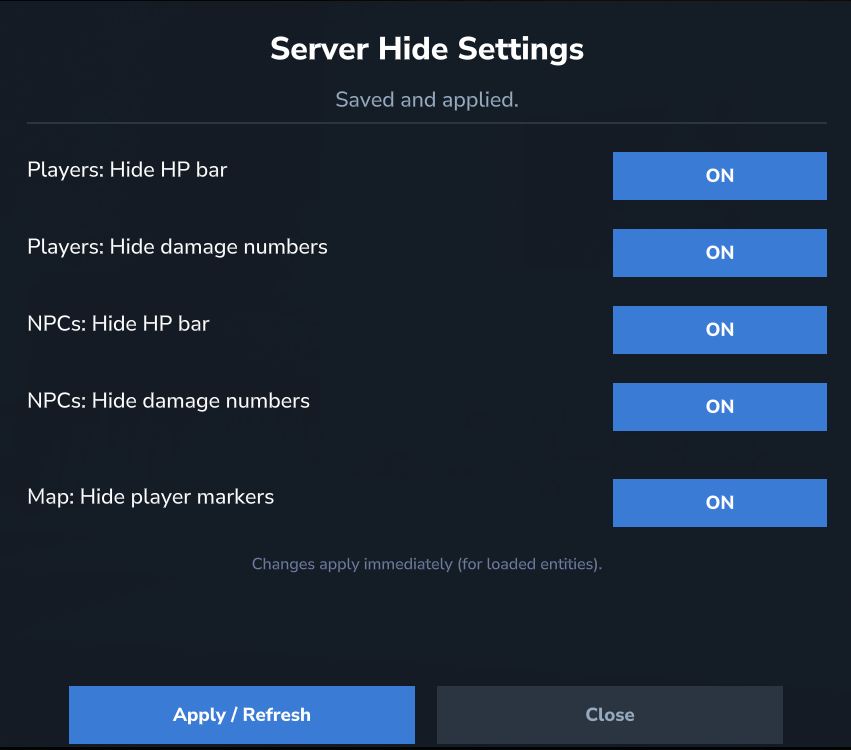
A server-side mod/plugin for Hytale that hides HP bars above entities and (optionally) damage/heal numbers. It can be controlled in-game via an admin UI dashboard and also supports a disk-based config.
Скриншоты
Описание
Спрячьте здоровье (Hytale Server Mod/Plugin)
Серверный мод / плагин для сказка что скрывает HP бары выше сущностей и (необязательно) Повреждение/целевые числа. Его можно контролировать в игре через панель инструментов admin UI а также поддерживает конфигурацию на основе диска.
Цель: уменьшить визуальный беспорядок в бою и сделать визуальные эффекты сервера более чистыми, не требуя клиентского мода.
Особенности
- ✅ прятаться Бары HP выше субъектов
- ✅ прятаться боевой текст (количество повреждений/заживления)
- Отдельные настройки для:
- Игроки ()
игроки) - NPCs
npcs)
- Игроки ()
- ✅ В игре admin Dashboard UI (ON/OFF переключатели)
- ✅ Сохраняет настройки в файле и применяет их в реальном времени (обновить)
- ✅ Серверный подход: изменяет сущность
UIComponentListКлиент делает меньше UI
Требования
- Hytale Server (совместимость зависит от API сервера)
- Java 25
Установка (сервер)
- Построить
.джар(см. строить ниже) или использовать готовый выпуск. - Поместите мод в папку сервера (обычно)
модс/— зависит от вашей установки. - Запустите сервер.
- Присоединяйтесь к аккаунту, который имеет
hideenenehealth.adminПолучить разрешение /op. - Откройте приборную панель:
/hid ui
После первого запуска будет создан файл конфигурирования:
Моды/HideEnemyHealth/config.json
командование
Базовая команда: прятаться
Помощь / Hid HelpПоказать помощь/hid info— показать информацию о моде и текущие настройки/hid ui- откройте панель инструментов admin/hid скачать— перезагрузить конфигурацию с диска (admin)
Разрешения
hideenenehealth.admin— доступ к UI и функциям администратора
Важно: убедитесь, что система разрешений вашего сервера фактически предоставляет это разрешение правильному игроку.
конфигурация
Файл: Моды/HideEnemyHealth/config.json
Пример:
{
"Включено": правда,
"Игроки": {
«HideHealthBar»: правда
«Скрытые цифры»: ложные
?
"npcs": {
«HideHealthBar»: правда
«Скрытые цифры»: ложные
?
?
Показать оригинальное описание (English)
HideEnemyHealth (Hytale Server Mod/Plugin)
A server-side mod/plugin for Hytale that hides HP bars above entities and (optionally) damage/heal numbers. It can be controlled in-game via an admin UI dashboard and also supports a disk-based config.
Goal: reduce visual clutter in combat and keep the server’s visuals cleaner — without requiring a client mod.
Features
- ✅ Hide HP bars above entities
- ✅ Hide combat text (damage/heal numbers)
- ✅ Separate settings for:
- Players (
players) - NPCs (
npcs)
- Players (
- ✅ In-game admin Dashboard UI (ON/OFF toggles)
- ✅ Saves settings to a file and applies them live (refresh)
- ✅ Server-side approach: modifies an entity’s
UIComponentList→ the client renders less UI
Requirements
- Hytale Server (compatibility depends on the Server API)
- Java 25
Installation (Server)
- Build the
.jar(see Build below) or use a prebuilt release. - Place the mod into your server folder (commonly
mods/— depends on your setup). - Start the server.
- Join with an account that has the
hideenemyhealth.adminpermission or get /op. - Open the dashboard:
/hid ui
After the first start, the config file will be created:
mods/HideEnemyHealth/config.json
Commands
Base command: hid
/hid help— show help/hid info— show mod info and current settings/hid ui— open the admin dashboard/hid reload— reload config from disk (admin)
Permissions
hideenemyhealth.admin— access to the UI and admin functions
Important: make sure your server’s permission system actually grants this permission to the correct role/player.
Configuration
File: mods/HideEnemyHealth/config.json
Example:
{
  "enabled": true,
  "players": {
    "hideHealthBar": true,
    "hideDamageNumbers": false
  },
  "npcs": {
    "hideHealthBar": true,
    "hideDamageNumbers": false
  }
}
Последние версии
hideenemyhealth-1.2.0.jar
Информация
Авторы:
Категории:
Версии игры:
Создан: 28.01.2026