SimpleClock
Mod adds simple clock time for your world
Описание
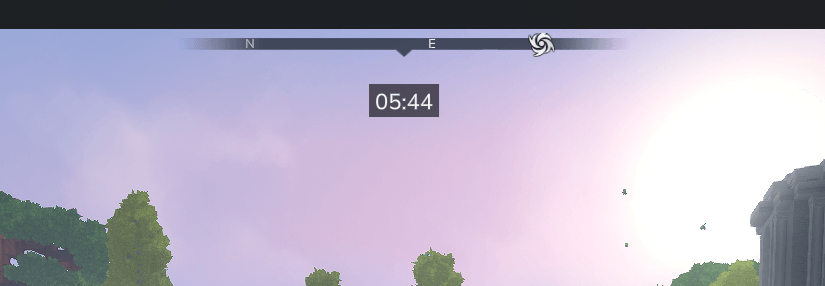

Мировые часы
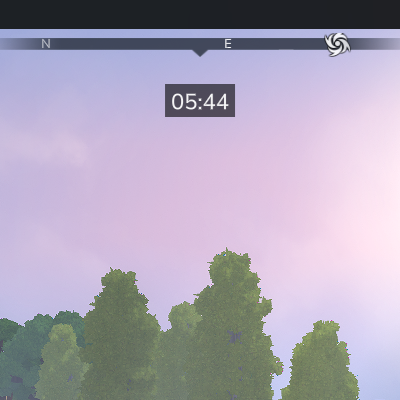
Простой Мод качества жизни Это добавляет чистые игровые часы в ваш мир.
World Clock помогает вам отслеживать время, не загромождая экран и не нарушая погружение. Он легкий и настраиваемый.
Особенности
- ️️ Отображает текущее игровое время
- Включить или отключить часы в мире
- Регулируемый размер шрифта и формат
- Легкий и минимальный UI
- Поддержка MultipleHUD
️ Конфигурация
{
"ClockPattern": "hh:mm",
"Часовая позиция": "центр",
"WidthClockArea": 77,
"BackgroundColorEnabled": правда,
"FontSize": 16,
"WorldsWithClockEnabled": [править]
"по умолчанию"
]
?
Варианты конфигурации
Часовой шаблон Определяет, как отображается время.
Примеры:
- 24-часовой формат
HH: мм20:45 - 24-часовой формат
yyyy-MMM-dd HH: мм→ 0001-Jan-01 20:45 - 12-часовой формат
hh: мм a08:45 утра / pm - 12-часовой формат с пользовательским текстом
Время: hh:mm a→ время: 08:45 утра/пм
Часовая позиция Установите положение часов на экране. Возможные значения: левый, центр, правильно - еще не реализовано
WiddClockArea Контролирует ширину фоновой области часов.
Увеличьте это значение, если формат времени длиннее или кажется тесным.
BackgroundColorEnabled Включает или отключает фоновый цвет.
размер шрифта Изменяется размер текста часов.
Скачать WorldsWithClockEnabled Список миров, где видны часы.
The по умолчанию Мир включен по умолчанию.
Если у вас есть какие-либо проблемы, перейдите на вкладку «Проблемы» и добавьте новую проблему.
Показать оригинальное описание (English)
🕒 World Clock
A simple quality-of-life mod that adds a clean in-game clock to your world.
World Clock helps you keep track of time without cluttering your screen or breaking immersion. It’s lightweight and configurable.
✨ Features
- ⏱️ Displays the current in-game time
- 🌍 Enable or disable the clock per world
- 🔠 Adjustable font size and format
- 🪶 Lightweight and minimal UI
- ⚙️ MultipleHUD supported
⚙️ Configuration
{
  "ClockPattern": "hh:mm",
  "ClockPosition": "center",
  "WidthClockArea": 77,
  "BackgroundColorEnabled": true,
  "FontSize": 16,
  "WorldsWithClockEnabled": [
    "default"
  ]
}
Config options
ClockPattern Defines how the time is displayed.
Examples:
- 24-hour format
HH:mm→ 20:45 - year-month-day 24-hour format
yyyy-MMM-dd HH:mm→ 0001-Jan-01 20:45 - 12-hour format
hh:mm a→ 08:45 am / pm - 12-hour format with custom text
'time:' hh:mm a→ time: 08:45 am / pm
ClockPosition Sets the position of the clock on the screen. Possible values: left, center, right - not implemented yet
WidthClockArea Controls the width of the clock background area.
Increase this value if the time format is longer or appears cramped.
BackgroundColorEnabled Enables or disables background color.
FontSize Changes the size of the clock text.
WorldsWithClockEnabled List of worlds where the clock is visible.
The default world is enabled by default.
If you have any problems, go to Issues tab and add new issue.